Itty Bitty Circuit Getting Started Guide
From first join to a working circuit that earns cash and fans.
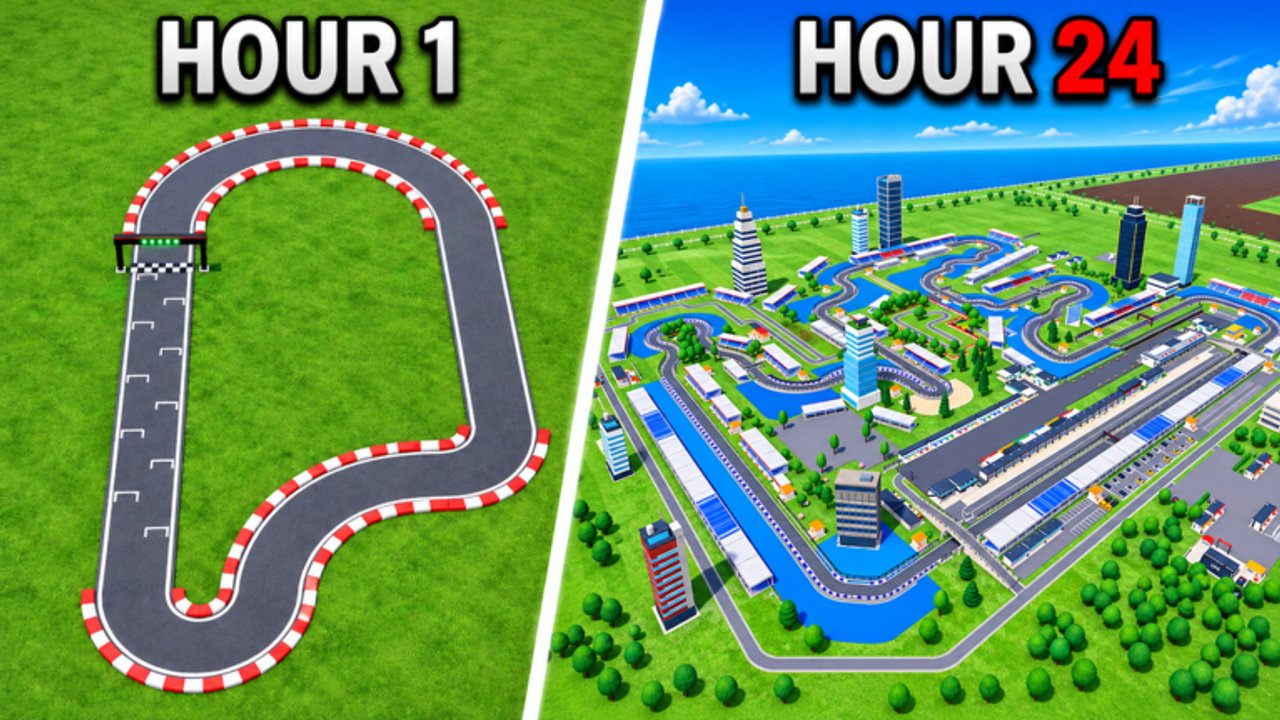
Itty Bitty Circuit is a free-to-play Roblox Sports & Racing tycoon by ogm10_endea. You design a custom racing circuit, host events from club-level F4 racing up through Formula 1 and Hypercars, then expand garages, paddocks, and facilities while earning cash, fans, reputation, and sponsor deals. The experience entered BETA on 13 September 2026, so UI labels can shift—but the day-one plan below still works: close a small track, race constantly, then expand.
This guide is your first-hour checklist. For cash optimization see How to Get Money Fast. For piece-by-piece construction see How to Build a Racing Track. For build UI habits see Controls. For contracts and attendance see Sponsors & Fans. For stands and land see Facilities & Upgrades. For habits and passes see Tips & Tricks. Browse the full Guides Hub anytime.
What you are building
Think of the game as a venue simulator, not only a lap timer. Your job is to:
- Lay a closed racing loop with a finish line, straights, and corners.
- Host races so cash and fans start flowing.
- Clear objectives for extra money and reputation.
- Unlock and sign sponsors for another income stream.
- Add facilities (spectator stands, pits, paddocks, garages) and eventually land expansion for bigger layouts and higher event classes.
If you spend the first session only decorating empty land, you will feel stuck. Racing is the engine; everything else is fuel and chassis.
First session checklist
- Join the official place and open the build tools for your circuit plot.
- Place the finish line first—it anchors the route and race logic.
- Add straight sections to set length, then corner pieces to change direction.
- Connect every segment cleanly so there are no gaps or floating joins.
- Bring the route back to the finish line so the circuit is a closed loop.
- Confirm the track is editable later (you can reshape anytime—do not fear a tiny first layout).
- Host a race as soon as the loop is valid. Do not wait for a “perfect” stadium.
- Open your objectives list and knock out easy early tasks for cash and reputation.
- Reinvest race payouts into the next bottleneck: a missing connection, a cheap stand, or a small facility—not a giant unused paddock.
- Repeat races. Cadence beats one huge payday.
Understanding cash, fans, reputation, and sponsors
| System | Role early on | What to do |
|---|---|---|
| Cash | Pays for track pieces, stands, facilities, land | Host races and clear objectives |
| Fans | Grows with events; stands help capacity/feel | Race first, then add spectator stands |
| Reputation | Tied to objectives and progression | Finish listed tasks as they appear |
| Sponsors | Extra income once requirements are met | Unlock offers, place signs, honor contracts |
Fans and cash both come from racing. Stands make the venue feel alive and support fan growth, but an empty grandstand next to an unfinished track earns nothing. Sponsors are powerful once your business looks legitimate—meet their requirements instead of ignoring the tab until mid-game.
Event classes and why F4 comes first
You progress through racing classes roughly from F4 toward Formula 1 and Hypercars. Early venues should focus on hosting whatever class is currently available on a short, reliable loop. Bigger classes want better facilities and reputation; unlocking them without cash flow is a trap. Treat each successful event as practice for the next tier rather than a reason to rebuild the whole map overnight.
Facilities and land—when to buy
After a few race cycles you will see options for garages, paddocks, pit-related buildings, and spectator stands (including medium stands). Buy facilities that remove a clear bottleneck: more fan capacity, better paddock presence, or requirements for the next sponsor/event tier. Land expansion is exciting but expensive relative to early race income—expand when the current plot cannot fit the next useful piece, not because empty grass looks incomplete.
For a full spending order, use How to Get Money Fast. For layout craft, use Build Track.
Optional game passes (know before you buy)
The game is free; passes are optional Robux helpers:
- Drivers Pack — 99 R$
- F1 Bundle — 149 R$
- Auto Event — 249 R$
- Non-Collision Pass — 599 R$
New players should learn the manual race-hosting loop before buying Auto Event. Non-Collision is a luxury for busy builds, not a beginner requirement. Details and when each pass is worth it live in Tips & Tricks.
Codes and updates
As of November 2026 there are no active promo codes. Check Codes after patches. Follow Updates for BETA notes, and keep this wiki bookmarked—server size is 4, sessions are short, and a clear plan between joins matters.
Common beginner mistakes
- Building a huge open layout before the first race.
- Leaving gaps so the circuit never counts as closed.
- Ignoring objectives while grinding only “pretty” track pieces.
- Buying land expansion with your first big payout instead of stands or race volume.
- Waiting for Hypercar-ready facilities before learning F4 hosting.
Avoid those, and your second hour feels dramatically better than your first.
Next steps after this guide
- Finish a tiny closed loop and host several races in a row.
- Skim Controls so edit and host clicks stay clean.
- Read Money Fast to lock the economy order.
- Grow contracts with Sponsors & Fans and stands with Facilities & Upgrades.
- Improve the racing line with Build Track, then Tips & Tricks.
- Return to the Guides Hub when you need a refresher.
You now know what Itty Bitty Circuit asks of you on day one: a closed circuit, constant events, objectives, then sponsors and facilities. Close the loop, start the race, and grow from there.
Frequently Asked Questions
Quick answers to the most common questions.
What should I do first in Itty Bitty Circuit?
Place a finish line, connect straights and corners into a closed loop, then host races immediately. Expand only after cash and fans are flowing.
Can I edit my track after I build it?
Yes. Circuits remain editable, so start small and reshape later instead of waiting for a perfect first design.
How do fans and sponsors work for beginners?
Fans grow mainly from racing events; stands help once races are regular. Sponsors appear as your venue meets requirements and add another income stream.
Do I need game passes to progress?
No. The game is free to play. Passes like Drivers Pack, F1 Bundle, Auto Event, and Non-Collision are optional accelerators.
Are there beginner promo codes?
None are active as of November 2026. Watch the Codes page when the BETA adds promotions.