Itty Bitty Circuit Track Building Guide
Design a closed, editable circuit that hosts races cleanly.
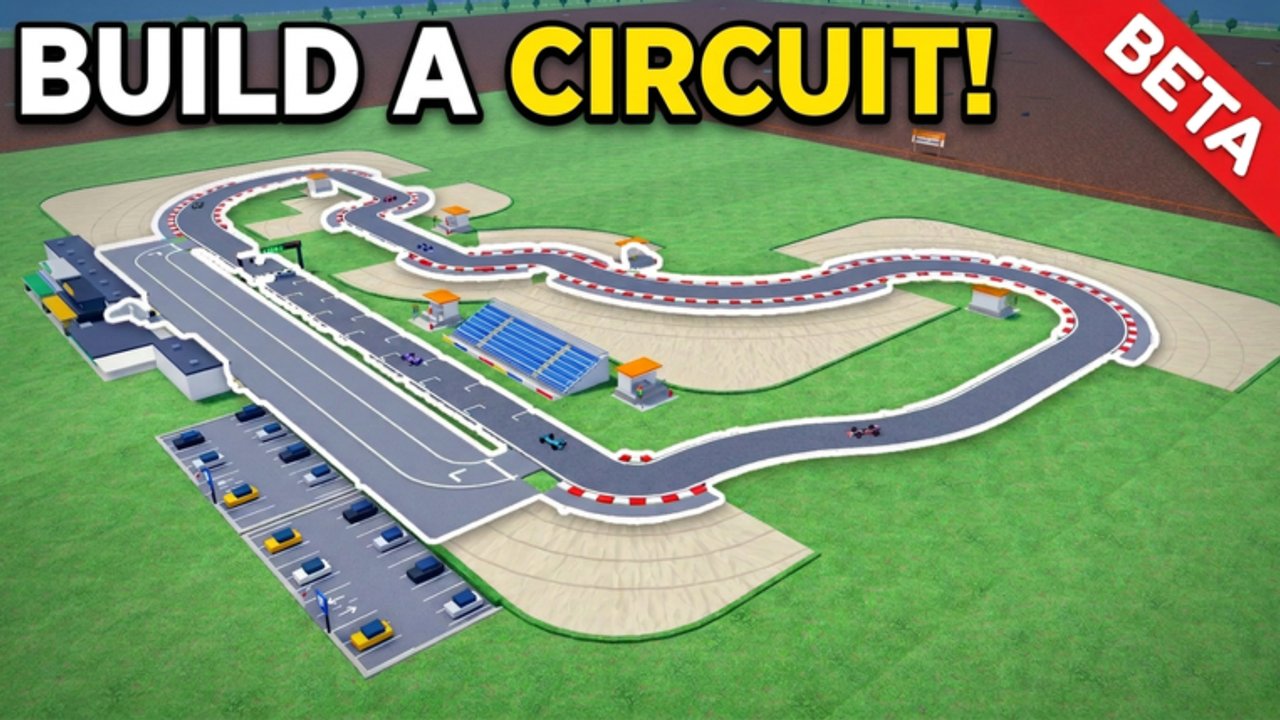
Building a racing track is the heart of Itty Bitty Circuit. This Roblox Sports & Racing tycoon by ogm10_endea asks you to design custom circuits with straights and corners, then wrap facilities—garages, paddocks, stands—around a loop that can host events from F4 toward Formula 1 and Hypercars. A pretty ribbon of asphalt that never closes is worthless. A humble closed loop that races tonight funds everything else.
This guide focuses on construction order, clean connections, editable workflows, and layouts that stay raceable as you expand land. For economy timing see How to Get Money Fast. For first-hour setup see Getting Started. For polish and passes see Tips & Tricks. All guides live on the Guides Hub.
Build order that always works
- Place the finish line — Anchors race logic and gives you a clear start/end target.
- Lay straights — Set the basic length and rhythm of the lap.
- Add corner pieces — Change direction; mix radii as tools allow so the lap is not one boring oval forever.
- Connect every section — No gaps, no floating joins, no half-snapped edges.
- Close the loop — Bring the final segment back into the finish line so the circuit is complete.
- Test by hosting — If you can run an event, the loop is valid enough to earn cash and fans.
- Edit anytime — Reshape after you have income; do not wait for a perfect blueprint on day one.
That sequence matches how successful players actually open venues in BETA: finish line → straights → corners → close → race → iterate.
Why the finish line comes first
Starting with scenery or random corner clusters makes it easy to paint yourself into a corner (literally) with no clean way to close. The finish line is both a gameplay object and a planning landmark. Build outward from it, then home in. When you expand later, keep the finish accessible so you are not ripping the entire timing logic out of a finished stadium.
Straights, corners, and flow
- Straights create speed and recovery space between turning complexes.
- Corners define character—tight hairpins versus sweeping bends change how races feel and how spectators see the action.
- Alternate rhythm: long straight → braking zone / corner complex → short straight → another change of direction. Even a tiny first track benefits from one “interesting” corner instead of four identical turns.
- Keep sightlines in mind when you later place stands; fans want to watch the racing line, not a service road.
You do not need elevation wizardry on day one. Comments from builders mention newer elevation tools—use them once the flat loop already races cleanly.
Closing the loop without tears
Most failed first tracks are 90% done with one awkward gap. Budget the last pieces carefully:
- Leave a known gap size near the finish rather than hoping two random ends meet.
- Prefer adjusting the final straight/corner combo over rebuilding half the map.
- After closing, host immediately. Visual “almost closed” is not the same as a raceable circuit.
Remember: the track remains editable. A slightly ugly first closure that earns money beats a beautiful unfinished sculpture.
Facilities relative to the racing surface
Once races pay, place spectator stands (including medium stands) where they overlook active corners or main straights. Add paddocks, garages, and pit-related buildings as progression and sponsors demand. Facilities should support the venue story—cars, teams, fans—without blocking the racing line or preventing future corner edits.
Land expansion buys room for longer layouts and more buildings. Expand when the current plot cannot fit the next useful segment or stand cluster. For when to spend versus race, lean on Money Fast.
Iteration workflow for growing venues
- Race on the current closed loop until cash is comfortable.
- Note pain points: boring section, no space for stands, awkward entry to pits.
- Edit one sector at a time; re-close and re-test with a host.
- Add a facility or sponsor requirement piece.
- Only then open new land and extend the lap length.
This keeps you in the income loop while the circuit evolves toward higher classes (F4 → Formula 1 → Hypercars).
Design goals by progression stage
| Stage | Track goal | Facility focus |
|---|---|---|
| First hour | Short closed loop, zero gaps | Maybe first cheap stands |
| Early growth | One memorable corner complex | Stands + basic paddock/garage |
| Mid venue | Longer lap with clean flow | Sponsor signs, pits, more seating |
| High tier prep | Layout fit for bigger events | Full facilities + land as needed |
Common building mistakes
- Decorating land before the loop closes.
- Leaving micro-gaps that prevent hosting.
- Building stands that block future corner edits.
- Expanding land then abandoning the old raceable section.
- Chasing a real-world replica before you understand piece snapping.
Cross-links while you build
- Getting Started — full beginner checklist including first host.
- Money Fast — why racing the small loop funds better asphalt.
- Tips & Tricks — hosting cadence, passes like Auto Event / Non-Collision, and best-practice habits.
- Tier List — what to prioritize when budgets hurt.
- Updates — BETA build-tool changes.
- Guides Hub — index of all walkthroughs.
Quick recap
Place the finish line, run straights, connect corners, close the loop, host a race, then edit with confidence. Facilities and land make the venue world-class later; a closed circuit makes it profitable now. Master that order and your Itty Bitty Circuit track will carry you from club racing toward the biggest motorsport events the BETA offers.
Frequently Asked Questions
Quick answers to the most common questions.
What is the correct order to build a track in Itty Bitty Circuit?
Finish line first, then straights, then corners, then close the loop back to the finish. Host a race to confirm it works before major expansions.
Can I change my circuit after it is finished?
Yes. Tracks are editable anytime, so start with a small closed layout and reshape sectors as you earn cash.
Where should I put spectator stands?
Overlook busy straights or corner complexes so fans see the racing line. Add stands after the loop already hosts races.
When do I expand land for a bigger track?
When the current plot cannot fit the next useful sector or facility. Do not expand before the existing loop is earning.
Why won’t my race start?
Usually the circuit is not fully closed or a connection is incomplete. Fix gaps at the finish line area and try hosting again.